An AI character that talks to visitors from the corner of your site.
A text-only chatbot feels impersonal and is easy to forget. With AI-navi, a character whose mouth, eyes and expressions move guides visitors, by voice too. The animation is lightweight, so it doesn't slow your site down.
You added a chatbot, but nobody uses it.
It feels impersonal and hard to talk to
A small text-only window is easy to overlook and gives visitors little reason to start a conversation.
Reading text is a burden for some people
For visitors who find it hard to read a screen closely, spoken guidance can help.
It doesn't match your site's look
A stock icon or logo alone can feel out of step with your brand.
A character that speaks and shows how it feels.
The motion is a simple build: the mouth, eyes and expressions are switched between still images.
The mouth moves when it talks
While a reply is read aloud, the mouth image switches quickly. It is a simple movement, not an exact mouth shape matched to the voice.
Expressions change with the tone
Smiling, surprised, troubled, sad and more: the eye and mouth images switch to fit the mood of the conversation, and the character blinks every few seconds.
Voice read-aloud and voice input
Replies can be read aloud, and visitors can speak via the microphone. Visitors choose whether sound is on or off. The standard browser voice has no extra charge; you can switch to a more natural voice such as Azure (extra charge).
Adjust the look, voice and speed
Choose the character, size, position, name and speaking speed in the admin panel. Uploading your own original character is available on the Standard plan and above.
Speaks 5 languages
Japanese, English, Chinese, Korean and Spanish. Text replies and voice read-aloud both switch to the language the visitor picks.
It doesn't just answer. It points.
Ask "How much is it?" and the page scrolls to the right button and highlights it with a red frame. The character guides visitors with a "Here it is."
The actual character's expressions
The mouth and eyes switch to fit the mood of the conversation.




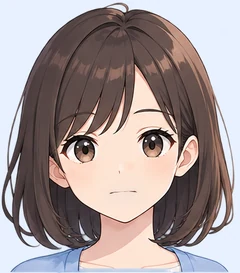
It isn't as smooth as Live2D or 3D, but that makes it very lightweight.
AI character chatbot: FAQ
What is AI avatar customer service?
It means a character (avatar) on your website speaks to visitors, answers questions and guides them. With AI-navi, a character shown in the corner of your site answers FAQs and guides visitors to the right button or page.
Does the character move like Live2D or 3D?
No. It is a simple build that expresses the mouth, eyes and expressions by switching images. It isn't as smooth, but it is lightweight and doesn't affect your site's loading speed.
Can I use my own original character?
On the Standard plan and above, you can upload face, eye and mouth parts in the admin panel. On the Light plan, you choose from the characters provided.
Can it be used as a voice chatbot?
Yes: it reads replies aloud and accepts voice input through the microphone. The standard voice uses the browser's speech feature, so the available voices depend on the visitor's browser and device. For a more natural voice, you can switch to a service such as Azure (extra charge).
Related pages
Try it on your own site for 14 days.
Setup takes 10 minutes and no credit card is required. If it's not a fit, just stop using it.